The B2B Link for Baking Supplies
Worldwide Shippingsales@bakewarelink.com

For brands, retailers & importers

Private label bakeware.
Built around the product you want to sell.

Your product specification, brand and retail pack—developed as one orderable range.

BakewareLink coordinates private-label bakeware sourcing from product selection through branding, packaging and sample review. Bring an existing product, a reference sample or a range brief. We define the configuration for quotation, first-order approval and replenishment.

Silicone molds · Baking mats · Metal pans · Tools & accessories

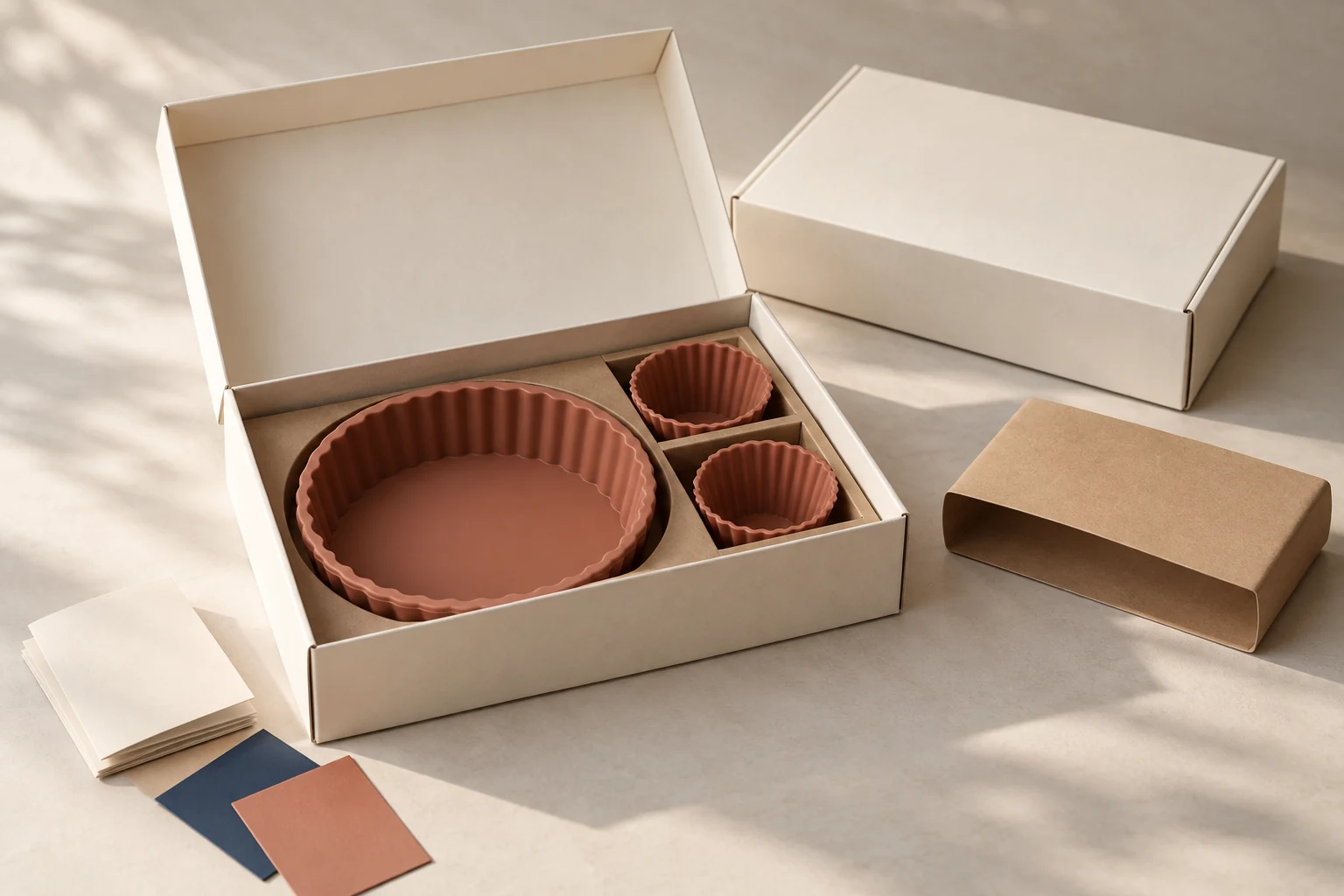
Terracotta silicone cake mold and two baking cups fitted in an unbranded retail box with packaging samples
Retail-pack concept illustration. Final contents and construction follow your approved specification.

Define the project

Start with the changes
your range needs.

Private label bakeware is bakeware supplied for sale under your own brand. The product, color or marking, selling pack and order record define the program. Branding can sit on the packaging, on the product, or on both.

First establish who will buy it and where it will be sold. A specialist retailer needs a clear shelf presentation. An ecommerce brand needs a pack that fits its fulfillment route. A distributor needs reliable SKU identification and replenishment data. Those requirements belong in the brief before pricing begins.

01

Packaging first

Brand an existing product

Use a selected pan, mold, mat or tool with its existing construction. Add a sleeve, label, care card or retail box that carries your brand.

Choose this route when
The current product meets the intended use and price position.
Approve together
Base product, artwork, pack fit and the assembled selling unit.
02

Color, marking & sets

Develop a coordinated range

Specify product colors, an appropriate logo method and a consistent pack system. Sell items individually or combine defined components into a set.

Choose this route when
Your range needs a common identity across several product formats.
Approve together
Each component, physical color references, marking and complete set contents.
03

Product development

Create a custom format

Change geometry, dimensions, cavity layout or construction when an existing format cannot meet the brief. Review tooling alongside branding and packing.

Choose this route when
A measurable product requirement calls for a different design.
Approve together
Drawing, manufacturing route, development sample and production specification.

Private label and custom manufacturing describe different decisions. A standard pan in your box is a private-label product. A changed pan depth or mold cavity adds development work. Review custom bakeware development →

Product selection

A coherent range starts
with measurable products.

Build around a baking task, customer group or useful set. Give every selling SKU a product reference, dimensions, construction, intended use and pack configuration. For a collection, confirm the same details for each component before applying a shared visual identity.

Use the catalog to establish the starting format. Product-level changes, colors and marking methods are reviewed against that format and the order brief.

Product families and the decisions that shape a branded program
Product familySpecify the productPlan the brand & pack
Silicone pans & molds ↗Overall size, cavity dimensions, wall construction, support during filling and handling, release and cleaning.Color, a molded mark where feasible, individual boxes or coordinated sets.
Reinforced baking mats ↗Silicone and reinforcement construction, finished dimensions, usable area, border and fit in the intended tray.Border color, printed logo or guides, sleeve and rolled or flat packing.
Metal baking pans ↗Metal type, thickness, formed dimensions, rim, finish and nesting or stacking requirements.Suitable marking, finish options, protective separation and retail packaging.
Baking tools & accessories ↗Working-end dimensions, handle construction, joints, finish and the task the tool must perform.Handle color or marking, hang tags, individual packs or accessory kits.
Paper & liners ↗Intended use, paper construction, sheet or roll size, liner shape and count per pack.Approved print scope, retail pack, labels and replenishment quantities.
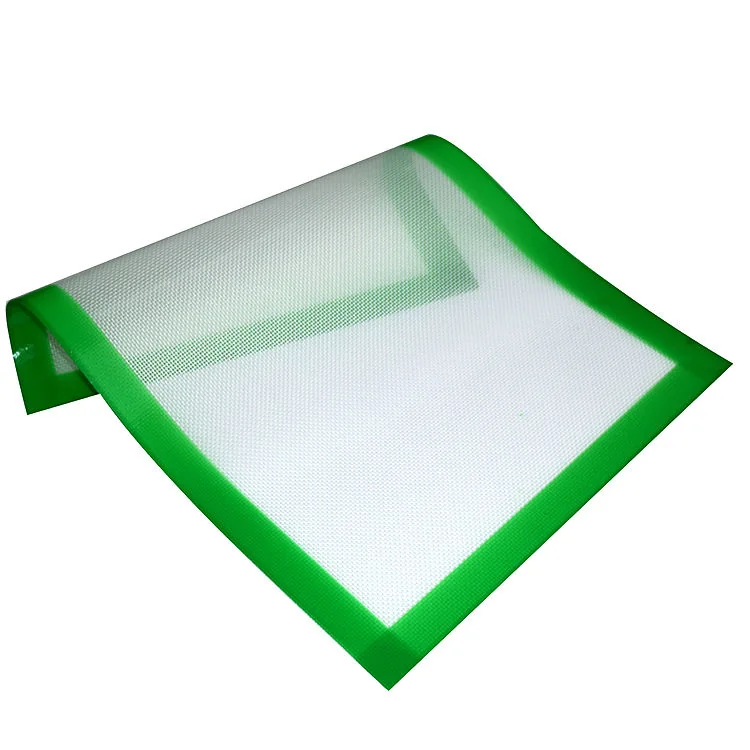
Flexible baking mat detail showing a green silicone border and reinforced center
Mat construction and finished edges are part of the product specification.

Details that affect the result

A shared color does not make different materials equivalent.

A reinforced mat, a solid silicone mold and a coated metal pan need different specifications. For the mat, define the finished dimensions and edge treatment. For the mold, check cavity size, wall construction and how it is supported during filling. For the pan, specify the metal, thickness, rim and finish.

Set up sample checks around the use you intend to describe on the pack. Heat-use limits, cleaning instructions and release claims belong to the selected construction and supporting product record. Keep those statements consistent in the listing, care card and retail artwork.

Prepare a product specification for quotation →

Brand execution

Approve the brand
on the actual product.

Logo placement, color and packaging artwork are separate production decisions. Select a method that suits the product’s material, surface and geometry. Where a product mark adds unnecessary complexity, a well-fitted branded pack can carry the identity.

Keep a named approval owner and a controlled artwork revision. Confirm who holds the files, what they can be used for and how changes are released. Define tooling ownership and any requested exclusivity in the project terms.

What to approve before releasing branding
Brand elementApproval requirementWhy it matters
ColorSpecify a physical reference for each material and finish. Silicone, coated metal and printed board need separate approval references.A photograph or screen swatch leaves production color open to interpretation.
Product logoSet the method, dimensions, position and orientation on the actual item. A molded mark may involve tool work; printed marks need their own sample.Adding a mark after product approval can change the surface, tooling or care requirements.
Pack artworkWork on the confirmed dieline. Identify folds, closure, copy, language, code position and the revision released for printing.A flat artwork proof does not show pack fit, hidden text or code scanning on an assembled box.
Use & care informationWrite instructions around the selected construction and approved use. Keep dimensions, contents and performance statements consistent across the pack and listing.Generic care copy can describe a different material or use from the product supplied.

Retail packaging

Design the pack around the contents and handling route.

A sleeve gives a single product a compact brand presentation. A box creates room for information and protection. A set insert locates several components. Select the format after confirming what the pack must hold and how the selling unit reaches the customer.

01 / Contents

Define the selling unit.

List every product and its quantity. Record the sleeve, insert, bag and care card as packing components. Keep the product-piece count consistent on the front panel, listing and packing instruction.

02 / Protection

Check movement and fit.

Assemble the pack with the selected products. Check clearances, retention, rubbing and closure. For nested pans or kits, define separation and packing sequence before finalizing the insert.

03 / Receiving

Separate retail from shipping.

Confirm the selling pack, inner pack and master carton independently. An ecommerce parcel may need protection beyond the retail box. Agree the handling checks for the actual fulfillment route.

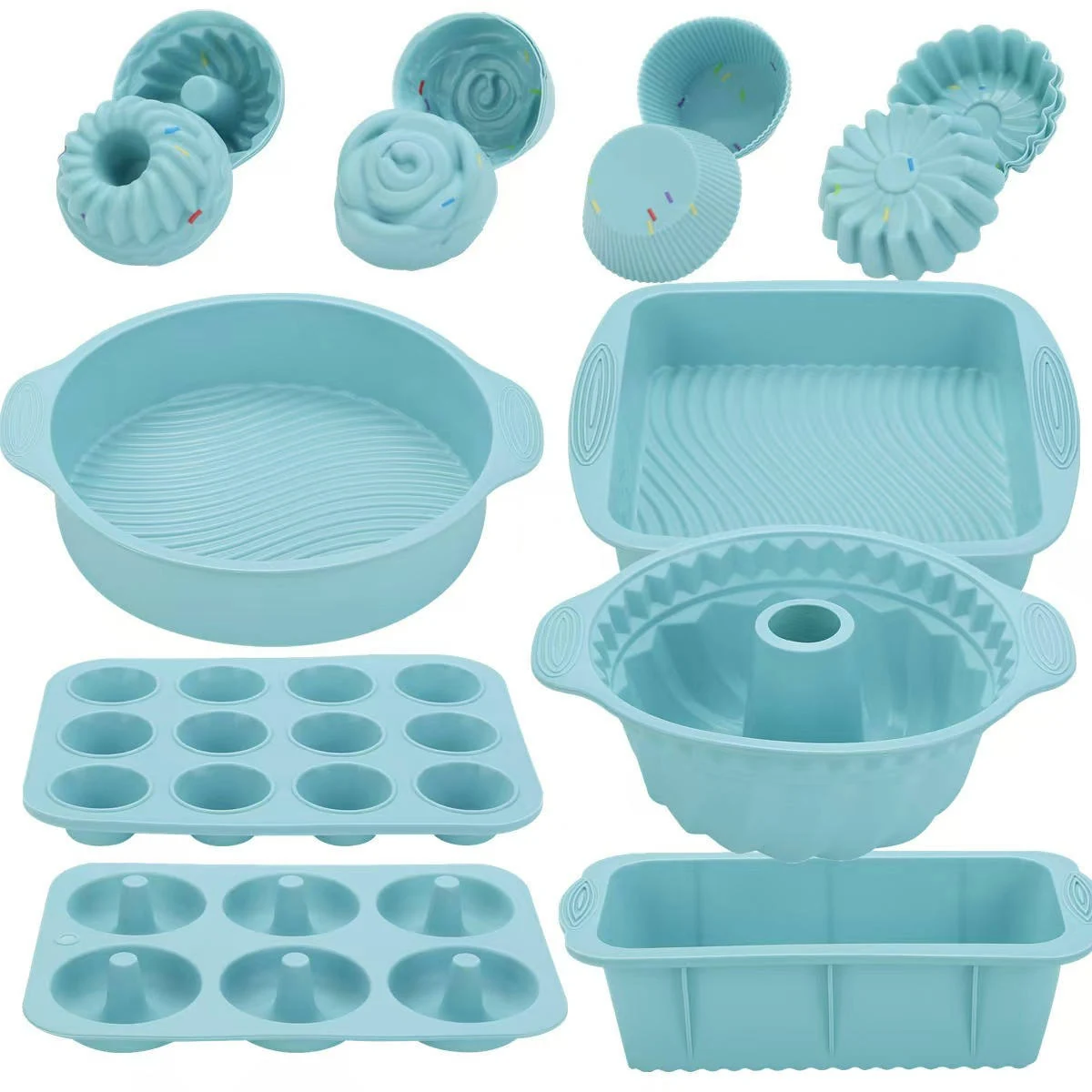
Aqua silicone bakeware assortment with round, fluted, loaf, muffin and donut formats
Assorted formats provide a starting point for a coordinated collection. Set contents are specified separately.

Planning a bakeware set

The component list controls the whole pack.

Count each pan, tray and individual cup as a product component. A muffin tray is one product piece; its cavities do not add to the set-piece count. Record the box, insert and instructions as packing components.

Specify each item’s dimensions, color and quantity, then quote the assembled set as one selling unit. If a loaf mold changes, recheck the insert, carton and pack copy before approving the replacement. The component list, product photographs and stated contents must describe the same set.

MOQ, price & launch planning

Quote the complete
selling configuration.

The product price is one part of a branded program. Compare quotations using the same product specification, decoration, pack contents, assembly and delivery scope. Identify development charges separately so the recurring cost of a reorder is visible.

Recurring unit cost

Product or set components, marking, selling pack, inserts, instructions, assembly and agreed carton packing. Confirm whether the price is per piece or per complete retail set.

Development & setup

Samples, color or marking trials, print setup, dieline development and any new product tooling. Confirm what is reusable and which changes trigger another charge.

Delivered-order cost

Agreed inspection and document work, transport, destination charges and receiving requirements. State the delivery term, named location and exclusions when comparing offers.

Product MOQ and packaging MOQ are separate.

A product minimum can apply by size, color or construction. A printed-pack minimum can apply by artwork or pack format. Set components also need to be available in the quantities required to assemble complete units.

For example, a plan for 600 selling units with 1,000 printed sleeves leaves 400 sleeves outside the initial shipment. Decide how that balance is paid for, stored and used before treating the first-order unit cost as the reorder cost.

Quantity example only; these figures are not BakewareLink order minimums.

Work back from the arrival date.

Plan product approval, artwork release, pack-material availability, bulk production, inspection and transport as separate dependencies. New tooling or a revised color adds work before production release.

Confirm the conditions that start the quoted production period, including accepted specifications, required approvals and the agreed payment stage. A requested launch date becomes a supply plan when those dependencies are aligned.

See the detailed development and approval process →

Samples & quality control

Give production a clear
approval standard.

A sample is useful when its role is clear. An existing-product sample establishes the starting format. A color or logo trial establishes brand execution. A complete packed sample establishes the selling unit. Record any difference between a sample and the proposed bulk configuration.

Retain the approved references with the SKU record. Convert subjective comments such as “good quality” into agreed dimensions, visual criteria and task-specific checks.

01

Product specification

Measure the agreed dimensions and inspect construction, finish and edges. Evaluate the actual baking or handling task under the intended conditions. Record the method and acceptance criteria.

02

Brand execution

Compare color with the retained physical reference. Check logo position, size and legibility. Review the decorated product through the agreed handling and care checks.

03

Complete retail unit

Count every product component. Check insert fit, closure, instructions and codes on the assembled pack. Confirm what the customer sees and receives.

04

Shipment configuration

Confirm pieces per inner, selling units per carton, protection, labels, dimensions and weights. Use the agreed inspection plan to decide whether the lot is ready for release.

Match product documents to the configuration being supplied.

State the destination, intended use and required documents at the briefing stage. Review the identity and scope of the records against the actual material, finish, color and decoration. Keep supported use limits and care instructions with the approved SKU; review them again when the product changes.

The final approval file connects the product reference, sample identification, artwork revision, packing instruction and inspection criteria. When a discrepancy appears, identify the affected SKU and agree the correction and recheck before release.

Launch & replenishment

Make the second order
as clear as the first.

The launch file and purchase record should describe the same product: dimensions, contents, color, care information, approved photos, codes and carton configuration. Confirm which files and records are included in the program and who releases revisions.

Keep the initial quantity separate from the replenishment forecast. Forecast each selling SKU and its shared packaging components. Review availability and timing for the next order against the retained approval record.

Product record

Drawing or specification, component list, approved sample and use information.

Brand & pack record

Color and logo references, released artwork, pack contents and assembly instruction.

Supply record

Order and lot identification, inspection result, carton data and accepted revisions.

Changes that require review before replenishment
What changed?What must be reviewed?
Size, geometry or wall constructionRecheck product performance, tray fit and packaging clearance. Update the drawing and product specification.
Material, finish, color or marking processReview the physical sample, care information and the scope of relevant product documents.
Set contents or component countUpdate the component list, insert, pack copy, photographs and unit cost. Reapprove the complete set.
Artwork, code or pack constructionApprove the new print revision and assembled pack. Recheck scanability, protection and carton data where affected.

Approve substitutions before they reach production. A similar-looking component can change fit, contents or product information. Keep the reason for the change and its accepted revision with the order. Coordinate a range across products and shipments →

Private label bakeware FAQ

Answers for your purchasing brief.

What is private label bakeware?

Private label bakeware is bakeware supplied for sale under a buyer’s own brand. The program defines the product, branding, retail packaging and order specification together. It can start from an existing format or include custom product development.

How is private label different from custom bakeware manufacturing?

Private label describes the brand under which the product is sold. Custom manufacturing describes changes to the product itself, such as dimensions, geometry or construction. An existing mold in your branded box is a private-label project; a new cavity design adds product development and tooling review.

Can I put my brand on the packaging only?

Yes. A sleeve, label, tag or retail box can carry your branding while the product keeps its selected construction. Confirm the pack format, information space, protection and any product-level identification needed for your program.

What is the MOQ for private label bakeware?

MOQ is confirmed for the selected product, size, color, marking and packaging. Printed boxes and set components may have separate minimums. Request quantities in the correct units: pieces, complete sets, printed packs or cartons. A range total does not establish the minimum for each SKU.

Can different bakeware products be supplied as one retail set?

Yes. Start with a component list that identifies each item, specification, color and quantity. Define the insert, care card and box separately from the product-piece count. Approve the complete packed set and quote it as one selling unit.

How long does a private-label bakeware project take?

The schedule follows the development scope and approval dependencies. Existing-product selection, color or marking trials, new tooling, print materials and pack assembly take different routes. Confirm the production-start conditions and work back from the required arrival date, including inspection and transport.

Which product documents should I request?

State the destination market, intended use and documentation requirements in the brief. Match the document record to the actual product construction, material, finish and decoration. Review the scope again when the configuration changes; a general catalog statement does not establish coverage for every branded SKU.

What should I send for a quotation?

Send product references or drawings, dimensions and construction, quantity per SKU and color, logo requirements, pack format, exact set contents, destination and required arrival window. Include artwork status and sample or document requirements. Identify decisions that still need a proposal.
Start your private-label program

Tell us what you
want to put on the shelf.

Share the product references, brand direction and selling channel. A focused brief lets us review the product route, pack configuration and quotation inputs together.

  • Product or set contents, dimensions and construction
  • Quantity per SKU, color and selling pack
  • Logo method, artwork status and pack language
  • Destination and required arrival window
  • Samples, documents and decisions needing a proposal
Download the brand brief ↓

For a detailed pricing checklist, use the custom bakeware RFQ guide →

Discuss your branded bakeware range